Open source · Self-hosted · Pre-alpha

Talk to exactly the right people. No one talks over anyone.

Conch is an open-source, self-hosted communications platform for gaming communities and coordinated teams. Push-to-talk voice, scoped text channels called nets, and screen sharing — run on a server you control, not someone else's cloud.

Pre-alpha: Conch is built from source today (make build). There are no packaged releases or downloads yet.

Where it's headed

One client. Text, voice, and who-hears-what — always visible.

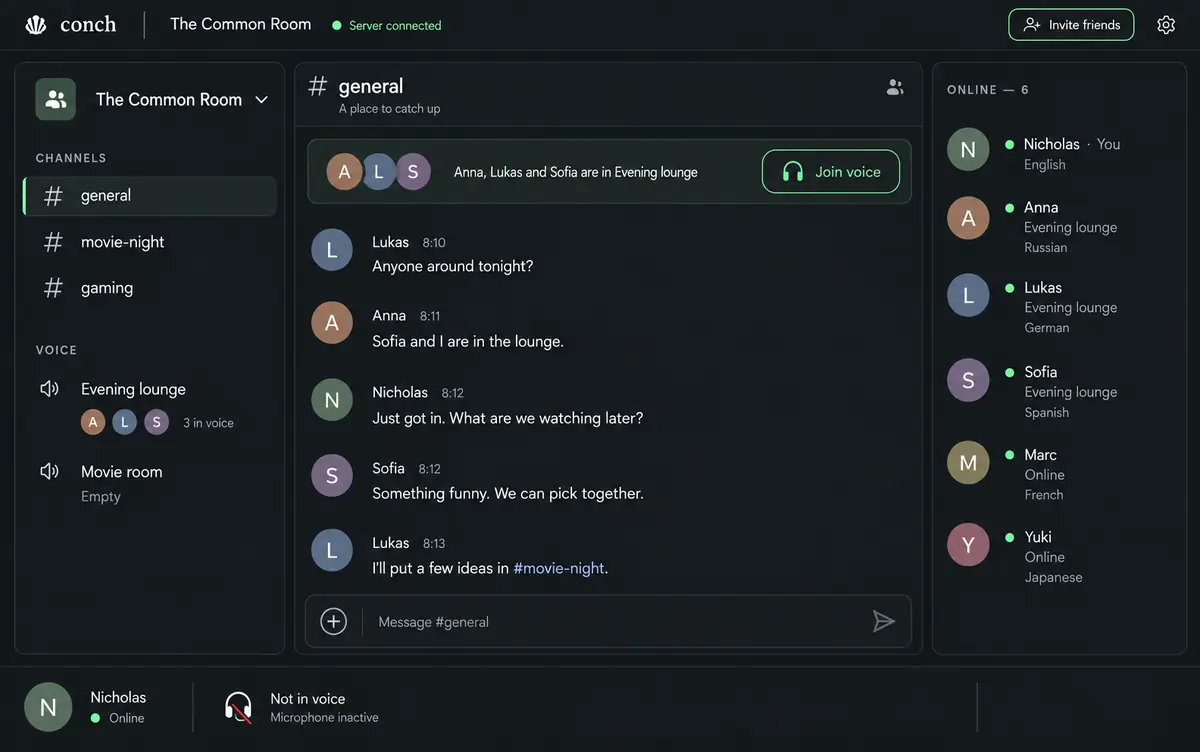
Conch's interface direction keeps your transmit target and listening set on screen at all times: browsing a text channel never silently redirects your push-to-talk key.

Design concept of the Conch graphical client: channels and voice rooms on the left, a text conversation in the center, and an online member list on the right.
Design concept from the Conch design references — a visual target for the graphical client in development, not a screenshot of a shipping product.

Features

Built for squads, fleets, and on-call teams

Every feature is labeled with its real state: available today, in development, or planned. No roadmap theater.

Available today

Push-to-talk voice

Hold a key, speak, release. Push-to-talk voice is available today in the browser client through an optional LiveKit service. A native Rust client (conch-voice, Linux/PipeWire first) is in progress.

Available today

Nets & whispers

A net is a named subset of a channel — a squad, a vehicle crew, a command group. Nets overlap, members speak, monitors listen, and whispers reach exactly who you name. Working in text today; layered voice per net is next.

Available today

Text chat that keeps up

Channels with threads, file attachments, full-text search, and unread state shared across your clients — through the Go CLI/TUI and public REST/WebSocket APIs.

Available today

Screen sharing

Share a screen into a voice room — one share at a time, with watch-only joining and quality presets for text or motion. Available today in the browser client through an optional LiveKit service.

Available today

AI participants, on a leash

Agents join over MCP with distinct identities, deny-by-default capability manifests, human-decided approvals, and a full audit log. They report runs and activity; people can intervene or cancel.

Available today

Self-hosted core

One Go binary with embedded SQLite — no required database, broker, or external service. Authentication on by default, invite-based joining, and an audit trail an operator can actually read.
Hosting

Run it yourself today. Managed hosting is planned, not sold.

Conch's deployment model is deliberately simple: one instance serves one community or organization.

Planned

Managed hosting

A hosted, multi-tenant Conch is on the roadmap — but hosted multi-tenancy is not implemented today, and there is no pricing, no waitlist, and nothing to sign up for.

  • Hosted multi-tenancy: not yet built
  • No accounts or billing exist to offer
  • Follow the repository for announcements

Development status

Pre-alpha, and honest about it

Available today: the Go server, CLI/TUI, public APIs, and browser-based push-to-talk voice and screen sharing. Everything below links to the source of truth in the repository.

Available today

  • Go server (conchd) & CLI/TUI (conch)
  • Browser client: push-to-talk voice & screen sharing
  • Text channels, threads, files, search, unread state
  • Text nets & whispers with member/monitor roles
  • Authentication by default, invites, audit log
  • AI agents over MCP: manifests, approvals, runs
  • REST & WebSocket APIs for every client feature

In development

  • Native Rust voice client (Linux/PipeWire first)
  • Graphical & desktop clients (Electron shell planned)
  • Real-world PTT reliability and platform validation

Planned

  • Layered voice listening & per-net PTT keys
  • Optional live captions and translation
  • Windows support & packaged releases
  • Managed, multi-tenant hosting

There are no packaged releases or installers yet. Conch is built from source (make build) — the quickstart walks through a full local setup in minutes.